Cards Exporter
Export a Trello board to Excel, CSV, PDF, Google Sheets or Notion. Check the preview, then download or send it.
For anyone who reports on a board outside Trello.
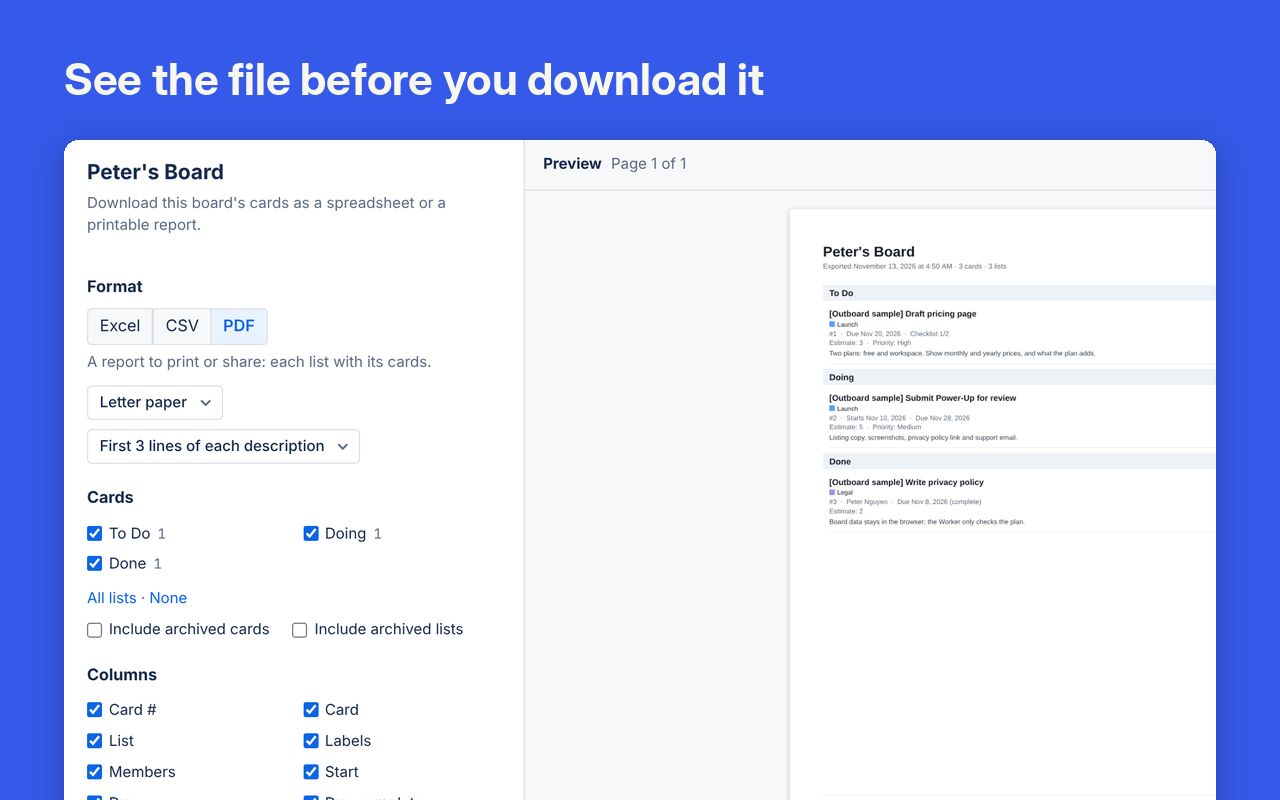
See the file before you download it
Pick the format, lists and columns. The preview updates as you choose.
Excel and CSV
Turn your boards into spreadsheets ready to use.
PDF reports
Generate PDF reports of your board, cards, lists and labels.
Export to Google Sheets or Notion
Each card becomes a row in a Google spreadsheet or a page in a Notion database. Boardwell can't see anything else in your Drive. Privacy policy.
Customisable export schedules
Every day, week or month, email the file to up to 10 people, save it in Google Drive or attach it to a card.
An email of what changed
A summary of the board since the last email: overdue cards, cards due soon, new, moved and finished cards, and comments, with the file attached. When nothing changed, nothing is sent.
Try it free for 7 days
Cards Exporter and every other Boardwell Power-Up work on every board in your workspace for 7 days from the first time you use one. No card needed.
More Power-Ups from Boardwell
Add your first Boardwell Power-Up
Adding one to a board takes about a minute.
Try it free for 7 days